AIOps and AI monitoring for your NOC
Agents watch your production systems, group related alerts into one incident, find the root cause and run the fix from your own runbooks. Risky actions wait for a person’s approval, and every action is logged.

- Autonomy
- Within the policies you set
- Response
- 100 ms average, 0.5 s maximum, from detection to first action
- Audit
- Every action logged with its evidence
Monitoring set-up, AIOps or AI agents?
From smarter alerts to agents that run the fix
AIOps, short for AI for IT operations, applies AI to the operational work around production systems: reading metrics, logs, traces and events, telling a real problem from noise, finding why it happened and acting on it. With agents it goes further than smarter alerts: the agents carry out the runbook step themselves, check that it worked and write up what happened. The aim is operations that run on their own wherever your policies allow, and less manual effort for your team.
Effred Technologies sets this up for companies in India and abroad with Effred SIM, our own AI monitoring product, whose agents monitor, troubleshoot, find the root cause, patch and resolve issues within the policies you set. We connect it to the signals you already collect, write the policies and runbooks with you, and decide together what the agents may do on their own. Where the work is not about production systems, such as access requests or tickets to sort, we build AI agents for it on the same rules.
Where the agents stop and your engineer on shift takes over
- Alerts grouped into one incident
- The root cause found
- The runbook step run within policy
- Risky steps to the engineer on shift
- The report written
What the agents do for your operations
Signals in one place
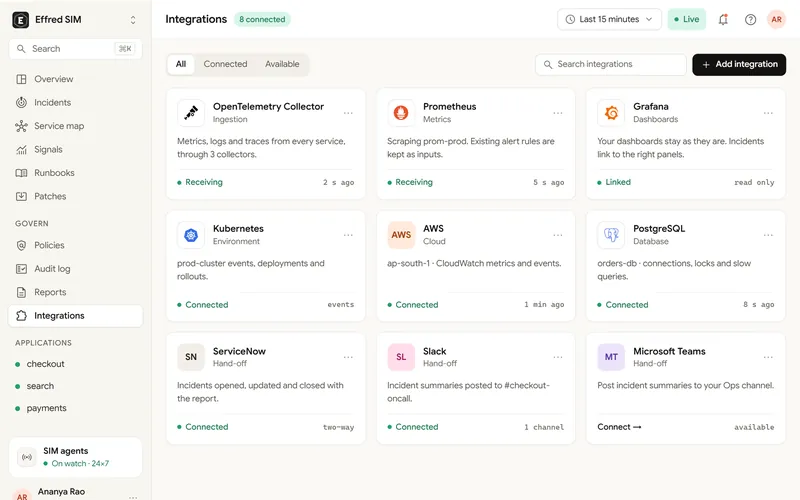
Metrics, logs, traces, events and synthetic checks through OpenTelemetry-compatible collectors and Prometheus, with your Grafana dashboards kept as they are. If monitoring is thin, we set it up first.
Monitoring set-upLess noise
Related alerts across services grouped into one incident, against baselines learned for each service and signal instead of fixed thresholds.
A root cause with evidence
Every incident traced to the change, the component and the signal behind it, so your engineers can check the reasoning.
Runbooks run by agents
Restarts, scale-outs and rollbacks from your own runbooks, run within your policies, checked against the same signals and rolled back if they do not help.
Patching in your windows
Patches planned into your maintenance windows, rolled out canary first with health checks, with approval for the ones you mark as risky.
Policies and approvals
You decide which actions run on their own, for which services and environments, and which wait for a person.
Reports written as it happens
An incident timeline and a post-incident report for every incident, filed to ServiceNow, Jira Service Management, Slack or Microsoft Teams.
Agents for the rest of IT operations
Access requests, duplicate tickets and routine requests handled by AI agents that prepare the work for a person to confirm.
AI agents for enterprise
How an incident runs when agents handle it
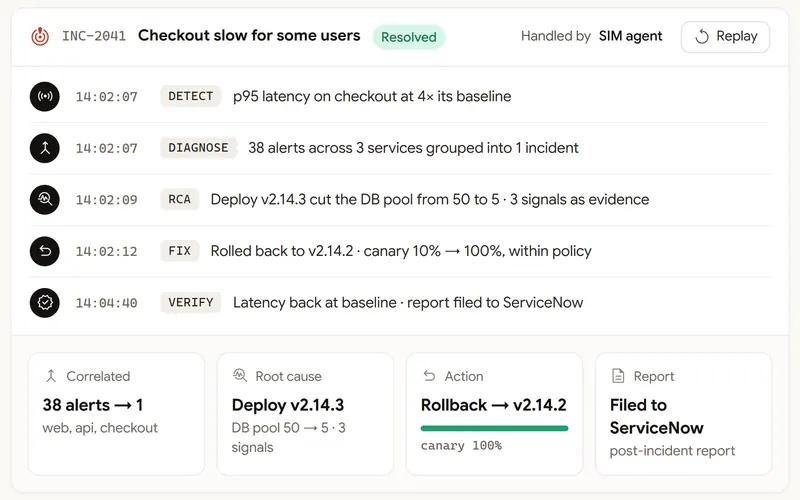
This is the course every incident takes in Effred SIM, from the first unusual signal to the report. The agents do each step on their own where your policy allows it, and stop for a person where it does not.

1. Detect
A signal moves away from the baseline SIM has learned for that service, and an incident opens.
2. Correlate
Related alerts across services are grouped into that one incident, so the real problem stands out.
3. Diagnose
The agents follow the dependency map and recent changes to the root cause: the change, the component and the signal.
4. Fix
The runbook action runs within policy, in stages, with a rollback ready.
5. Verify and report
The signals are checked back to normal, the ticket and the channel are updated, and the report is written.
AI agents that work with your NOC
Your NOC keeps its people and its tools. The agents take the routine steps off them, so the team handles what needs judgement.
Fewer alerts to watch
Related alerts grouped into one incident, so the screen shows problems, not noise.
The first steps done
Each incident arrives with its likely cause, the change behind it and the runbook step to take.
Routine fixes run
Restarts, scale-outs and rollbacks from your runbooks, within your policies and change windows.
Hand-off by your rules
Anything risky or outside policy goes to the engineer on shift, in ServiceNow, Jira Service Management, PagerDuty, Opsgenie, Slack or Microsoft Teams.
Reports written for the next shift
An incident timeline and a report for every incident, ready for the hand-over and the review.
No NOC of your own?
The agents run on watch 24×7, backed by our support team.
How we set up AIOps with you
- Step 1
Connect
The signals you already collect, the clusters, clouds and databases to watch, and the tools where incidents are handed off.
- Step 2
Learn
A live map of your services and their dependencies, and a baseline for every signal.
- Step 3
Write the policies
Which actions run on their own, in which change windows, and which wait for a person, agreed with you and written down.
- Ongoing
Run and review
The agents on watch 24×7, backed by our support team, and a regular review with you of what they did and what to hand them next.
The rules every AIOps agent follows
Works with: OpenTelemetry, Prometheus, Grafana, Datadog, New Relic, Dynatrace, Splunk · Kubernetes, Docker, VMware, Linux, Windows Server · AWS, Microsoft Azure, Google Cloud, Oracle Cloud · ServiceNow, Jira Service Management, PagerDuty, Opsgenie, Slack, Microsoft Teams
- Policies in writingWhat the agents may do on their own, for which services and environments, agreed and written down before they act.
- Approval for risky actionsAnything you mark as risky, such as a database change, waits for a person’s approval.
- Evidence for every actionEach action is logged with the evidence behind it, what approved it and the result.
- A way back, alwaysEvery change has a rollback, and the agents roll back on their own when a fix does not bring the signals back to normal.
- People behind the agentsEffred’s support team works 24×7 alongside the agents.
Questions about AIOps
What is AIOps?
AIOps, or AI for IT operations, uses AI to watch production systems, group related alerts, find the root cause of a problem and, with agents, act on it. It works from the same metrics, logs, traces and events your monitoring already collects, and turns them into incidents with a cause and a fix instead of alerts for people to chase.
Can AI agents run our IT operations with no manual steps?
They remove the routine manual steps wherever your policies allow: restarts, scale-outs, rollbacks, patching in your change windows and the incident reports. Each fix runs in stages with health checks and a rollback ready, and is rolled back if it does not help. Anything you mark as risky, such as a database change, waits for a person’s approval, every action is logged with its evidence, and any agent can be paused. We do not promise operations with nobody in the loop.
Can AI agents work with our NOC team?
Yes. The agents group the alerts, find the likely cause and run the routine runbook steps within your policies; anything risky or outside policy goes to the engineer on shift with the evidence. Your NOC keeps its tools, since incidents are handed off to ServiceNow, Jira Service Management, PagerDuty, Opsgenie, Slack or Microsoft Teams. Without a NOC of your own, the agents run on watch 24×7, backed by our support team.
How is this different from Effred SIM?
Effred SIM is the product: autonomous AI agents for production applications. This service is how we put it to work for you: we connect your signals, write the policies and runbooks with you, decide what runs on its own and review what the agents do with you over time. Effred SIM: AI monitoring.
How fast do the agents respond?
Effred SIM responds in 100 ms on average and 0.5 s at most, measured from detection to first action inside SIM: from the moment a signal is flagged as anomalous to an agent opening the incident and starting the diagnosis. It does not include the time signals take to reach SIM or the time a fix takes to complete.
Which systems does it work with, and do we need monitoring first?
Production applications on Kubernetes, Docker, VMware, Linux and Windows Server, on AWS, Microsoft Azure, Google Cloud or Oracle Cloud, with their databases. Incidents are handed off to ServiceNow, Jira Service Management, PagerDuty, Opsgenie, Slack, Microsoft Teams, email or webhooks. Monitoring in place helps, because the agents use the signals you already collect, such as OpenTelemetry, Prometheus or Datadog; if it is thin or missing, we set it up first as part of the same project. Monitoring set-up.
How is AIOps priced?
We fit Effred SIM to your environment and policies and quote after a demo on your stack. If monitoring needs setting up first, that is quoted with it.
Is Effred Technologies the best AIOps company in India?
We do not claim it, and no vendor can prove such a claim. What you can check: our AIOps runs on Effred SIM, our own AI monitoring product, which responds in 100 ms on average and 0.5 s at most from detection to first action; the agents act only within the policies you set, risky actions wait for a person’s approval, and every action is logged with its evidence; and Effred Technologies has worked with clients in 14 countries since 2010. Ask any AIOps vendor the same: what the agents may do on their own, how every action is logged and what their response time measures. What to ask any automation or AIOps vendor.