Enterprise AI agents that work inside your systems
We design, build and run agents that read documents, look things up, prepare entries and handle routine requests. Each one has the permissions of the person or team it works for, logs every step and waits for a person’s OK wherever you want one.
Effred Technologies is an authorised partner of OpenAI, Anthropic (Claude), Microsoft and AWS.
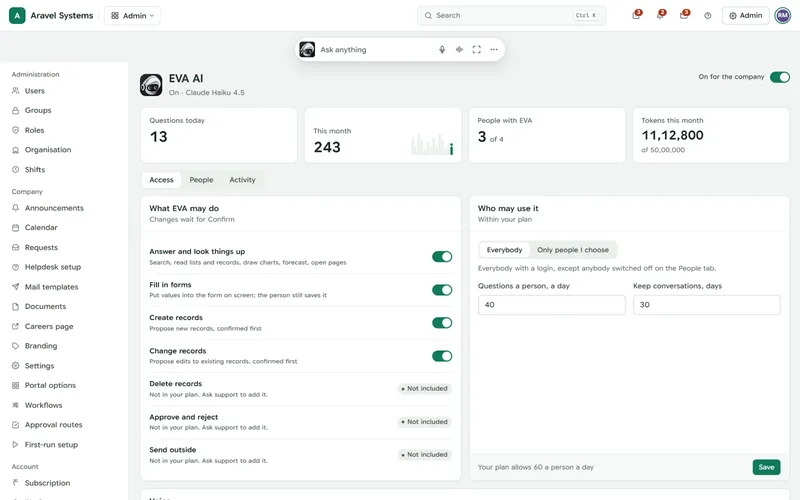
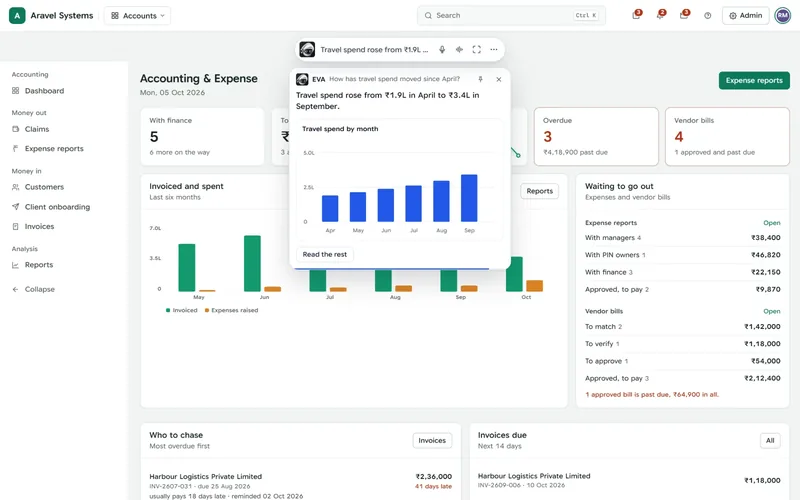
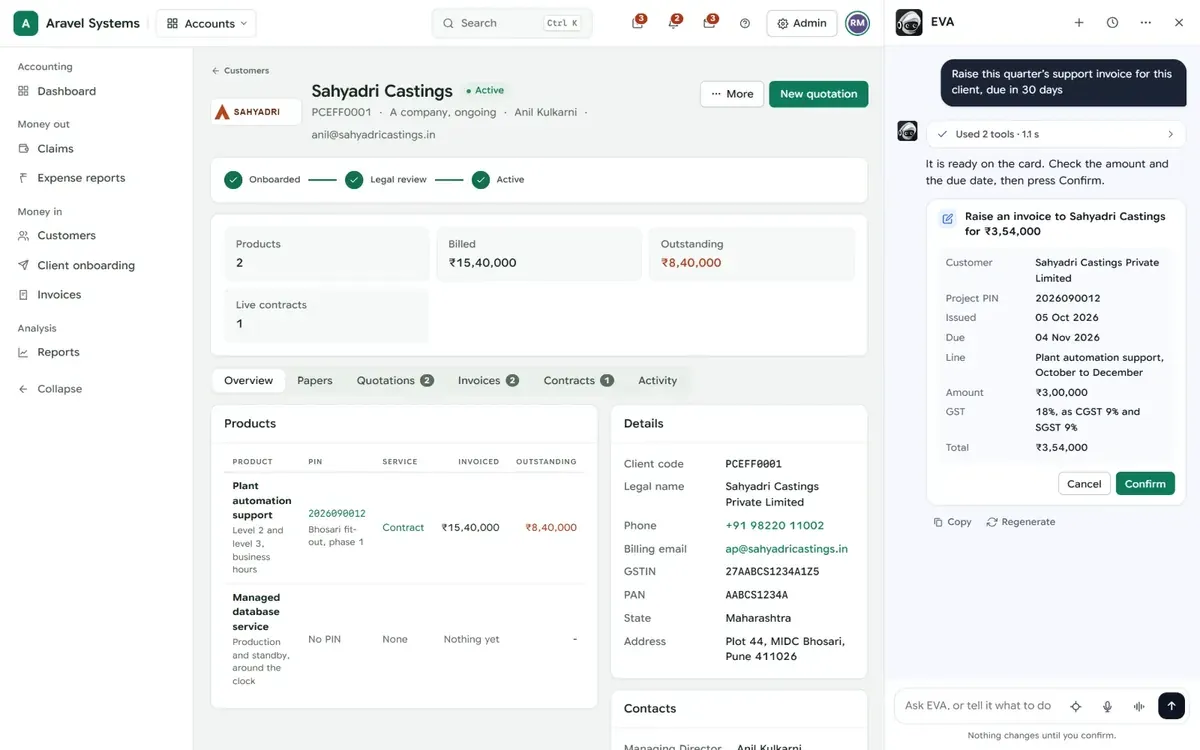
- Autonomy
- Confirm-first, or within written policies
- Permissions
- The same as the person or role it works for
- Proof of concept
- Usually a few weeks, on your real data
What an AI agent is
An enterprise AI agent takes one piece of routine work off a team. It reads what comes in, such as an email, a PDF or a ticket, looks up what it needs in your systems and takes the next step within your rules. Unlike a chatbot, it works inside your systems; unlike an RPA bot, it copes with inputs that vary from one to the next.
Effred Technologies designs, builds and runs AI agents for finance, HR, IT operations, customer support, sales operations and procurement teams in India and abroad. We make two agents of our own and build yours on the same rules: EVA, the assistant inside Effred One, prepares changes and a person confirms them; Effred SIM acts on its own on production systems, within the policies its users set.
Most projects start with a paid proof of concept on your real data. It usually takes a few weeks and ends with measured accuracy, a plan and a fixed estimate; production is then built in two-week sprints, each ending with a demo. The rules we hold every agent to are in our guide to what an AI assistant should never do.
Chatbot, RPA bot or AI agent?
They are often confused, and most real workflows use more than one of them.
| Tool | What it does | Good for | Watch out for |
|---|---|---|---|
| Chatbot | Answers questions in a chat window. | FAQs, policy questions and order or ticket status. | It can’t act in your systems unless it is connected to them. |
| RPA bot | Repeats fixed clicks and keystrokes in the screens of other systems. | Stable, rule-based steps in systems with no API. | It breaks when a screen or a form changes. |
| AI agent | Reads varied inputs and takes the next step within rules, through your systems’ APIs. | Emails, PDFs and tickets that vary from one to the next. | It needs evals, permissions and logs. We build them in. |
Where agents help first
These are tasks agents take on, written as the agent would report them.
Finance
Start with the work that arrives in volume and follows rules: supplier invoices, purchase-order matching and bank reconciliation. Agents read the documents from email or scans, check them against your ERP or accounting system and leave the exceptions for your accounts team.
Systems often involved: SAP, NetSuite, Zoho, Microsoft 365
- “Matched this morning’s supplier invoices to purchase orders and left the mismatches for you to check.”
- “Prepared last month’s bank reconciliation and flagged entries with no matching invoice.”
- “Collected the expense claims that are missing a receipt and asked each person for it.”
HR
Start with onboarding and the questions HR answers every day. Agents raise the requests a new joiner needs across HR, email and the IT desk, and answer policy questions from your own handbook, with the clause they came from.
Systems often involved: Workday, Zoho, Microsoft 365, Google Workspace
- “Raised the new joiner’s laptop, email and payroll requests, and chased the approvals still waiting.”
- “Answered a leave-policy question from the handbook, with the clause it came from.”
- “Listed this week’s leavers with the accounts and equipment still to be returned.”
IT operations
Start with the alerts and requests that follow a runbook: access requests, duplicate tickets and routine fixes. On production systems, Effred SIM’s agents act within the policies you set, and anything risky waits for a person.
Systems often involved: ServiceNow, Slack, Microsoft Teams
Effred SIM: AI monitoring- “Saw checkout latency rise, rolled back the last deploy within policy and opened an incident note.”
- “Closed duplicate tickets about the same outage and linked them to one incident.”
- “Prepared the access request a manager approved, for the system owner to confirm.”
Customer support
Start with sorting and first drafts: tagging tickets, finding the order or account they refer to and drafting a reply. Agents work inside your helpdesk and CRM, and a person checks and sends each reply.
Systems often involved: Zendesk, Salesforce, Zoho, WhatsApp Business
- “Sorted the overnight tickets by urgency and drafted replies for an agent to send.”
- “Found the order behind each delivery complaint and added its status to the ticket.”
Sales operations
Start with CRM upkeep and the admin after a meeting. Agents merge duplicates, fill in missing company details and log meeting notes against the right deals, and leave every change for a person to review.
Systems often involved: Salesforce, Zoho, Microsoft 365, Google Workspace
- “Merged duplicate CRM contacts and filled in missing company details for review.”
- “Logged yesterday’s meeting notes against the right deals and listed the follow-ups due.”
Procurement
Start with supplier onboarding and quote comparisons. Agents collect documents from suppliers by email, check them against your checklist and enter an approved supplier in your ERP once a buyer confirms.
Systems often involved: SAP, NetSuite, Zoho, DocuSign
- “Collected a new vendor’s onboarding documents and listed what is still missing.”
- “Put three suppliers’ quotes for the same order side by side for the buyer to choose.”
What goes into every agent we build
Agent design and scoping
One task, its inputs, the systems it touches and its limits, written down before the build, with the measures of success agreed.
Connected to your systems
Through the APIs of the software you already run, such as Microsoft 365, Google Workspace, Zoho, SAP, NetSuite, Salesforce, ServiceNow, Workday and Zendesk, with RPA for screens that have no API.
How we connect systemsDocuments, emails and tickets
Invoices, purchase orders, contracts, emails and tickets read by AI and checked against your rules; anything unclear goes to a person.
Permissions and approvals
Each agent works with the permissions of the person or team it works for. Changes wait for a person’s confirm, or run within the written policies you set.
Evals and guardrails
Test sets and accuracy tracking for every agent, prompt-injection defences, and PAN, Aadhaar and account numbers masked before a model sees them.
Logging, alerts and a pause switch
Every step logged with who, what and when, an alert when a step fails, and a way to pause any agent at once.
The right model for each task
Claude, GPT, Gemini, Mistral or open-source models self-hosted with vLLM, compared on your data for quality, speed and cost.
AI developmentRun and improve
We run the agents after launch, report the agreed measures every month and add the next task once the first one is working.
Scaling with a CoE
You decide what an agent may do
Every agent runs in one of two modes, and your policy decides which one each task uses. Either way it works with the permissions of the person or team it works for, and every step is logged.
Confirm-first
The agent prepares; a person confirms. It drafts the entry, the reply or the change, and nothing is saved until someone allowed to approve it says yes. This is how EVA works inside Effred One.
Policy-based
The agent acts within written policies, such as rolling back a deploy or restarting a service, and records why. Anything outside the policy, or marked as risky, waits for a person. This is how Effred SIM works in production.

Guardrails on every agent
- Permissions respected: an agent sees and does only what its person or team may
- PAN, Aadhaar and account numbers masked before a model sees them
- Prompt-injection defences: documents and emails are data, never instructions
- Evals with test sets and accuracy tracking
- Every step logged: who, what, when
- Any agent can be paused
- Open-source models on your own servers when data must not leave
Build, buy or both
Not every task needs a custom agent. This is how we usually decide.
Off-the-shelf assistants
ChatGPT, Claude and Microsoft 365 Copilot cover a lot of everyday work, such as drafting, summarising and research. We choose the plans, set them up with single sign-on and data controls, and manage the seats.
Enterprise AI subscriptionsA custom agent
When the work runs through your own systems, rules and documents, a custom agent does it inside them, with your permissions and an audit trail.
See the use casesRPA for stable clicks
Fixed, rule-based steps in a system without an API are often cheaper as an RPA bot, and many flows mix the two.
Business process automationMany agents across a company
When several teams want agents at once, an Automation & AI Centre of Excellence keeps one pipeline, one set of standards and one way of measuring.
Automation & AI CoE
Where agents run, and how we measure them
Where your agents run
In your own cloud account or on your own servers, next to the systems they work with. For open-source models we set up GPU instances that start when they are needed and stop when they are not, or servers in your data centre when data must not leave it.
Servers & cloud infrastructureMeasuring what an agent is worth
Before the build we agree what to measure: hours removed, errors caught and turnaround time. We measure them before the agent goes live and report them every month after.
Across the client deployments we run, our automations remove up to 10,000 hours of manual work a day. What an agent removes for you depends on your own volumes, which is why we measure it in your numbers.
How we measure automation
From one task to an agent in production
- Step 1
Pick the task
One task with clear volume and rules: its inputs, systems and limits, and the measures agreed.
- A few weeks
Proof of concept
A paid proof of concept on your real data, ending with measured accuracy, a plan and a fixed estimate.
- Sprints
Build
Integrations, permissions, evals and logging, in two-week sprints with a demo at the end of each.
- Ongoing
Run & measure
We run the agent, report the agreed measures every month and pick the next task with you.
Works with
- Microsoft 365
- Google Workspace
- Zoho
- SAP
- NetSuite
- Salesforce
- ServiceNow
- Workday
- Zendesk
- Slack
- Microsoft Teams
- WhatsApp Business
How we build and run agents
- A proof of concept on your dataUsually a few weeks, ending with measured accuracy, a plan and a fixed estimate for production, including expected model usage costs.
- Evals before productionTest sets and accuracy tracking for every agent, with models compared on your data for quality, speed and cost.
- Permissions respectedEach agent sees and does only what the person or team it works for may see and do.
- Confirm-first, or within policyAgents prepare changes for a person to confirm, or act within written policies and record why. Documents and emails are data, never instructions: the rules we built EVA on.
- Every step loggedWho, what and when for every step, an alert when something fails, and a way to pause any agent.
Questions about enterprise AI agents
What is an enterprise AI agent?
Software that takes one piece of routine work off a team. It reads what comes in, such as an email, a PDF or a ticket, looks up what it needs in your systems and takes the next step within the rules you set: it either prepares that step for a person to confirm, or carries it out and records why. Unlike a chatbot it works inside your systems, and unlike an RPA bot it copes with inputs that vary.
Can an AI agent act on its own?
Yes, if your policy allows it. There are two modes. Confirm-first: the agent prepares the change and a person confirms it, the way EVA works in Effred One. Policy-based: the agent acts on its own within written policies, such as rolling back a deploy or restarting a service, and records why, the way Effred SIM works in production. You decide which mode each task uses, and every step is logged either way.
Which systems can your agents work with?
Systems with an API, which covers most business software, such as Microsoft 365, Google Workspace, Zoho, SAP, NetSuite, Salesforce, ServiceNow, Workday and Zendesk. Where a system has no API, an RPA bot can work its screens as part of the same flow. The agent connects with the permissions of the person or team it works for, never more.
How is our data protected?
The agent sees only what the person or team it works for may see. Personal identifiers such as PAN, Aadhaar and account numbers can be masked before anything reaches a model, prompt-injection defences treat documents and emails as data rather than instructions, and every step is logged. When data must not leave your network, the agent can use open-source models on your own servers.
How long does a first agent take?
A paid proof of concept on your real data usually takes a few weeks and ends with measured accuracy, a plan and a fixed estimate. Production is then built in two-week sprints, each ending with a demo, so you see the agent working on your systems before it goes live.
How much does an AI agent cost?
It depends on the task, the systems involved and the volume of work. The proof of concept is a fixed, paid piece of work on your real data, and it ends with a fixed estimate for the production build, including expected model usage costs, so you know the cost before the build starts.
Should we use AI agents or RPA?
Often both. RPA suits stable, rule-based steps in systems without an API, and it breaks when a screen changes. AI agents suit work whose inputs vary, such as emails, PDFs and tickets. Most flows use APIs where they exist, RPA where they don’t and AI to read documents, which is how our automation team builds them. Business process automation.
Can AI agents fully automate our operations?
The routine part, within your rules: agents take on the steps people repeat and act within written policies, while exceptions and risky actions wait for a person. On production systems, Effred SIM’s agents watch, diagnose and fix within your policies; in the back office, agents prepare or carry out the next step in your systems. The aim is less manual effort for your team, with every step logged. AIOps and agent-run operations.
Is Effred Technologies the best AI agent company in India?
We do not claim it, and no vendor can prove such a claim. What you can check: Effred Technologies has built software in Gurugram since 2010, for 500+ companies in 14 countries; we make two agents of our own, EVA and Effred SIM, and build yours on the same rules; a first agent starts with a paid proof of concept on your real data that ends with measured accuracy, a plan and a fixed estimate; and every agent works with the permissions of the person or team it works for and logs every step. Our guide lists the questions to ask any automation or AI agent vendor. How to choose an automation company, and what to ask any vendor.